Know what every Lambda function costs, and how to pay less
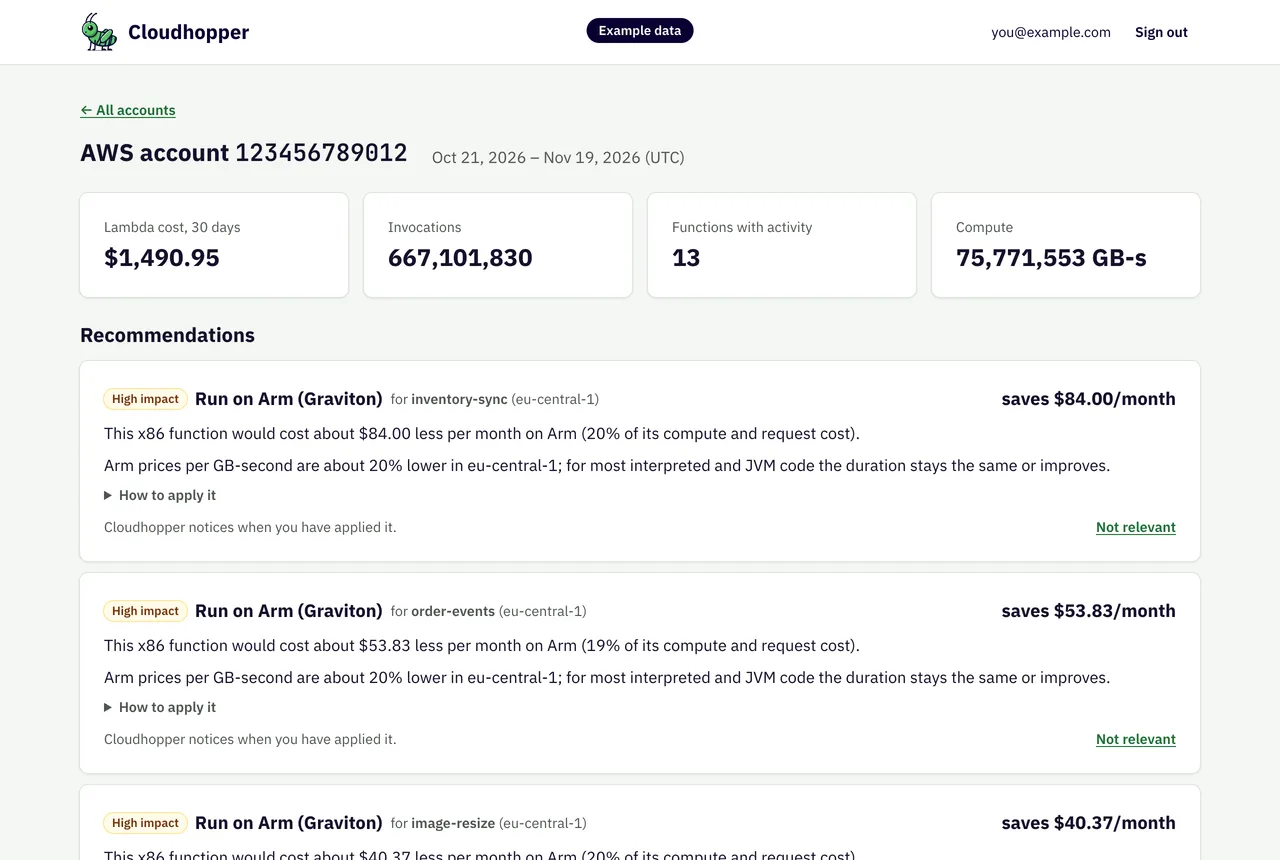
Cloudhopper reads the usage of your AWS Lambda functions through a read-only role, prices each function at AWS list price and recommends changes with their savings.
Free during the public beta. Read-only access. Disconnect any time; Cloudhopper then deletes the data it collected.
Example data: an invented account priced at AWS list prices.
How it works
1
Connect an AWS account
Sign up, create the read-only role CloudhopperCostReader with the CloudFormation template Cloudhopper links to, and paste the role’s ARN. You can read the template before you create anything.
2
Cloudhopper collects every day
Each morning it reads the previous day’s invocations, duration and log volume of every Lambda function in every enabled region. When you connect, it fetches the last 30 days, so the first figures are there right away.
3
Act on the recommendations
Each recommendation names the function, the reason, the expected effect and the steps to apply it. When the configuration changes, Cloudhopper marks it as applied and keeps the figures from before as a baseline.
Recommendations with the savings attached
Cloudhopper checks every function against its rules after each daily collection.
Arm (Graviton): the same function at the lower Arm price per GB-second, with the monthly saving in dollars. Shown when it saves at least $1 a month.
SnapStart for Java 11 and later: slow cold starts restored from a snapshot, at no extra cost for Java runtimes.
Not relevant for you? Dismiss it and it stays hidden; you can show it again later.
Example data
Every function, priced
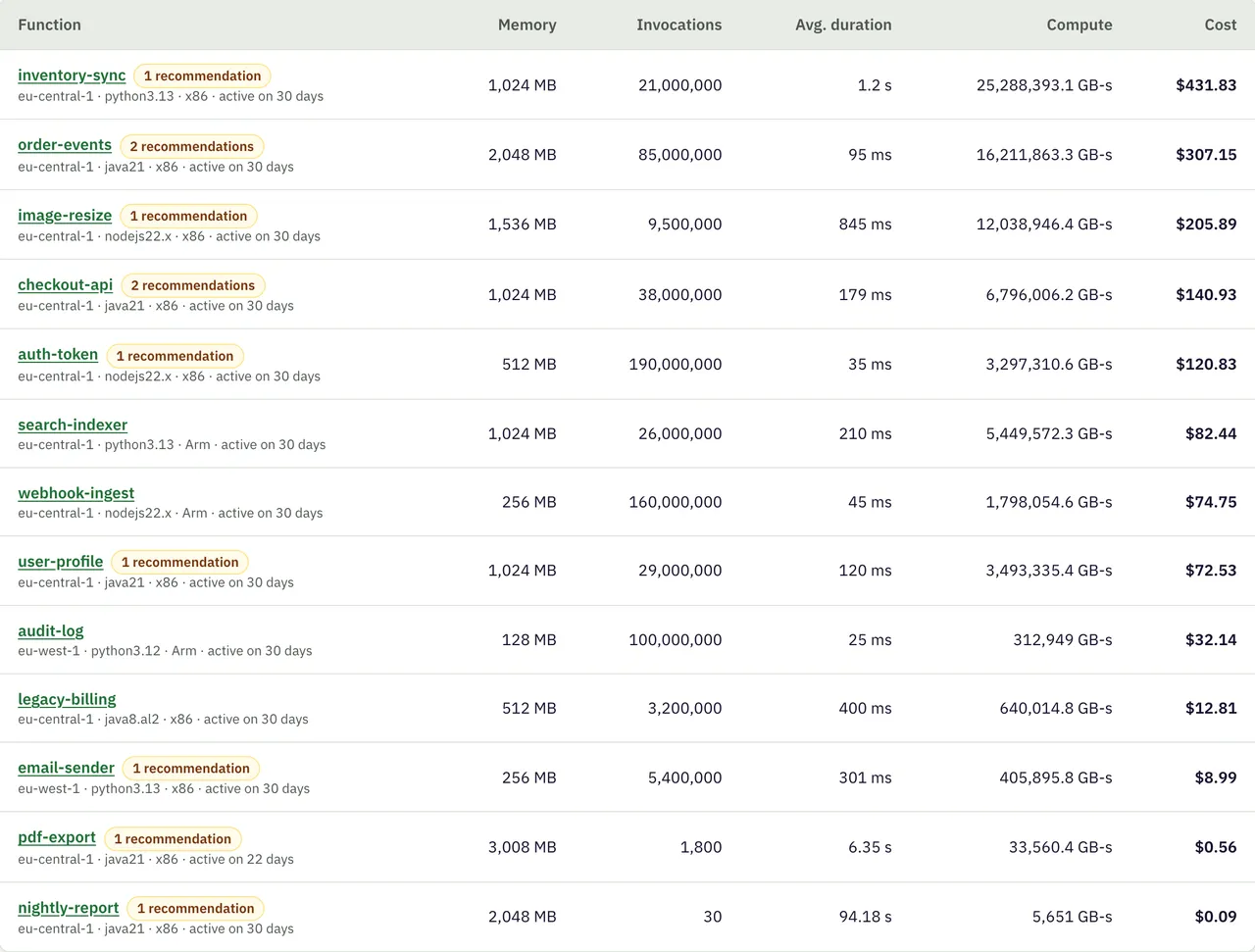
One table per account with the last 30 days of each function: memory, invocations, average duration, compute and cost, most expensive first.
Requests, compute and CloudWatch log ingestion at the AWS list price of the function’s region.
Each function links to its own page with the cost per day.
Example data
The same workload elsewhere
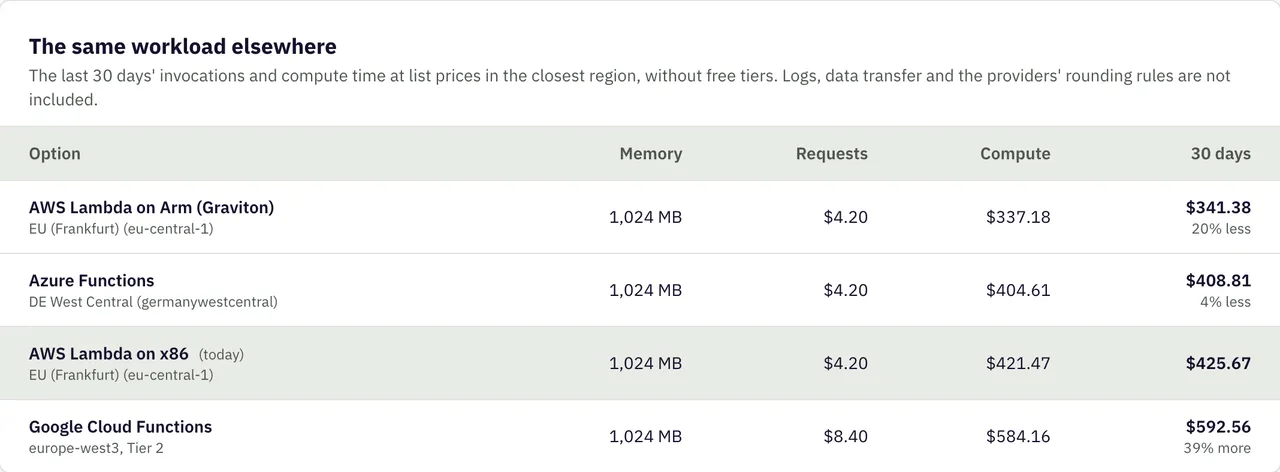
For each function, Cloudhopper prices the same invocations and compute time on Arm, Google Cloud Functions and Azure Functions in the region closest to yours.
List prices without free tiers, from the same price list as the cost calculator.
Logs, data transfer and the providers’ rounding rules are left out, so the figures compare like with like.
Example data
What the figures include
Cloudhopper computes the cost from CloudWatch metrics and the public price list, not from your bill. That makes it available per function and per day, before the invoice arrives.
Included
Requests
Compute in GB-seconds, by architecture and memory size
CloudWatch log ingestion
List price of each region (first paid tier)
What Cloudhopper can read
Access goes through a role in your account that only Cloudhopper can assume, with an external ID unique to you. Deleting the CloudFormation stack revokes it.
It can read
Your Lambda functions and their configuration (runtime, memory, architecture, SnapStart)
CloudWatch metrics of the functions and the names of their log groups
At Cloudhopper, we don't just analyze – we transform your serverless architecture into a model of efficiency and cost-effectiveness. Our unique, performance-based pricing means you invest in savings, not services.
In-Depth Spending Analysis: Discover Hidden Savings: Our Detailed Spending Analysis Identifies Overlooked Cost-Cutting Opportunities in Your Current Cloud Setup.
Code-Level Cost Optimization: Receive tailored recommendations to tweak your source code for peak performance and lower expenses.
Comparative Price Estimation: Find the Best Cloud Provider for Your Budget
Stay Ahead with Insightful Metrics: Our Continuous Reporting Keeps You Informed and Empowered to Make Smart Cloud Spending Decisions.
Custom Software Libraries: Our Custom Software Libraries are designed to effortlessly cut your costs and simplify your cloud migration.
Comprehensive Cloud Migration Assistance: Transition seamlessly to a more cost-effective provider with our expert guidance.
No risk and all the fun: You only Pay us if we can provide Real Measurable Results.